
You’ve carefully crafted an essay all night, tweaking every sentence, adding clever metaphors, and building tone like a master painter builds color. Then, in the final hours, you feed it into an essay revising app—a platform promising polish and grammatical prowess. What you get back is grammatically pristine but emotionally sterile. Your voice? Gone. This is the struggle thousands of students and writers face each day. As AI revision tools become more widespread, writers are discovering the need to “re-humanize” their work after automated editing.
TLDR:
While AI essay revision tools offer clarity and grammar corrections, they often flatten tone and erase the writer’s unique voice. Many students report sounding robotic or generic after using these platforms. This has led to a growing culture of “re-humanizing” content before submission. The solution? Use AI tools with awareness and take manual steps to restore your individual flair.
The Rise of Essay Revision Apps
Essay revision tools ranging from grammar checkers to fully integrated writing assistants have boomed thanks to advances in natural language processing (NLP). Industry leaders promise clearer writing, advanced vocabulary, and improved structure at the click of a button. But along with these benefits come unintended losses—mainly, the singular tone and rhythm of the original writer.
Here are four of the most popular AI-powered revision tools that, while helpful, often run the risk of overwriting your voice:
1. Grammarly
Strength: Grammar, punctuation, and clarity at a near-professional level.
Weakness: Comes on too strong with tonal corrections. Writers often find their casual voice turning into bland business-speak.
Grammarly has become a go-to app for students and professionals alike, offering a sleek interface and fast feedback. However, writers report that Grammarly’s tone editor aggressively pushes you toward a formal writing style—even in pieces that are supposed to be creative or conversational.
This creates a sense of “sameness” and strips your essay of its original mood. One student noted, “It told me to remove every contraction, and suddenly I sounded like a 19th-century butler instead of a freshman with opinions.”
2. Quillbot
Strength: Paraphrasing tool that helps avoid redundancy and expands vocabulary.
Weakness: Over-paraphrasing causes loss of intent and emotional nuance.
At first glance, Quillbot’s AI paraphrasing seems like a godsend. It can take your crude draft and morph it into elegant prose. However, the charm ends when the final text feels too “clean” to be human.
Many users have shared stories of how Quillbot changed the emotional register of their writing—turning a passionate critique into a lukewarm review. It’s helpful for fine-tuning, but dangerous when used to overhaul entire paragraphs. Writers say it often misunderstands metaphorical or culturally nuanced phrases, replacing them with generic wording.
3. ProWritingAid
Strength: Deep stylistic analysis, including readability and sentence variety.
Weakness: Encourages formulaic sentence construction that can kill narrative rhythm.
ProWritingAid stands out for its in-depth analysis, especially of writing style and structure. It even evaluates sentence length variation and passive voice usage. But like the others, it can over-correct and push writers out of their natural flow. A story that once danced with rhythm turns flat under calculated sentence optimization.
A literature student described her experience: “It flagged every single one of my complex sentences as hard to read. I ended up writing like I was reading a recipe book.” The tool is best used with limits — draw on its insights, but don’t let it recast your voice entirely.
4. Hemingway Editor
Strength: Promotes concise and clear writing, ideal for journalism or web writing.
Weakness: Harsh treatment of artistic complexity and subordinate clauses.
The Hemingway Editor champions clarity. Its signature interface highlights long sentences, passive constructions, and those ever-dreaded adverbs. While great for trimming fluff, it becomes a blunt instrument when applied to essays intended to be expressive or philosophical.
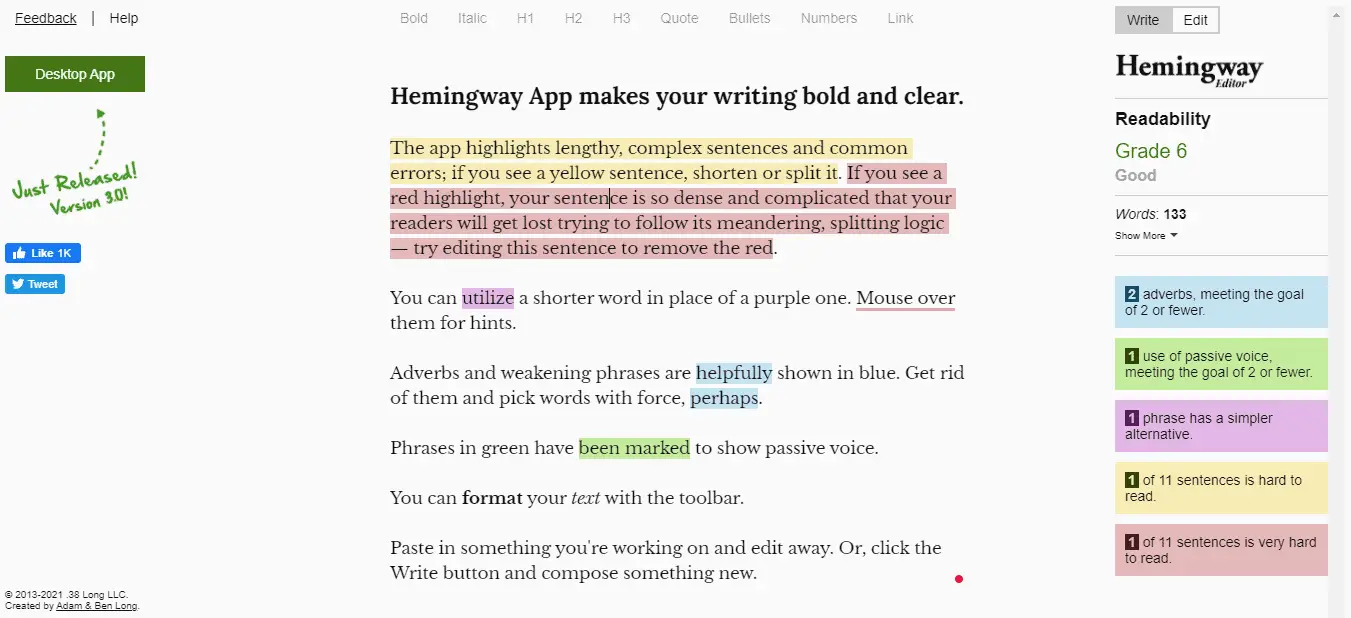
Writers attempting to explore abstract theories or intricate arguments find themselves frequently flagged. “It basically told me to rewrite my thesis as a tweet,” commented one philosophy major. Useful? Undoubtedly. But ideal for nuanced argument development? Probably not.
The Voice Problem: Why AI Doesn’t Always Get You
Despite advances in contextual understanding, AI doesn’t “get” your intent the way a human does. It lacks memory of your thought process or the narrative arc you’re trying to build. When AI flattens your tone or overwrites metaphors, it isn’t being malicious—it’s simply unaware of your personal intent.
These tools prioritize grammatical correctness and readability over emotional authenticity. And therein lies the greatest irony: to sound human in an AI-edited world, you often need to reclaim your humanity in the writing.
Writers Fight Back: The Art of Re-Humanizing
Knowing the pitfalls, students and professionals alike are starting to develop a straightforward new workflow:
- Write freely: Get your thoughts out without concerning yourself with refining.
- Use AI for mechanics: Let tools catch obvious errors—typos, grammar, double words, etc.
- Review the suggestions: Don’t accept changes blindly. Read each one aloud if needed.
- Reclaim voice: Reintroduce contractions, sensory language, or idioms where appropriate.
- Final pass: Read your essay as if it’s someone else’s. Does it sound like *you*? If not, edit again.
This strategy helps maintain the benefits of AI editing without becoming its victim. Writers even go as far as keeping an “original voice log”—a document with their favorite phrases or signature syntax—so they can re-insert them after AI revision.
How to Safely Use AI Editing Tools
Rather than abandoning AI tools entirely, savvy writers focus on leveraging their power without compromising their own expression. Here are a few smart usage tips:
- Switch between modes: Tools like Grammarly have “casual,” “neutral,” and “formal” tones. Choose accordingly.
- Use split screens: Compare original and edited versions side by side for full control.
- Personal context is king: AI doesn’t know your audience or personality. You do—edit with that authority.
- Collaborate with humans: Even asking a friend to read one paragraph can offer more value than a thousand automated edits.
Conclusion: It’s Not You vs. AI — It’s You + AI
Essay revision apps aren’t inherently bad. In fact, they’ve become essential lifelines for proofreading and catching things human eyes miss. But they are tools—and tools must be wielded with intention. By understanding how these platforms can inadvertently deprogram your tone or dilute your meaning, you can put yourself back in control of your work.
So the next time you click “accept all suggestions,” pause. Read it aloud. Ask yourself: Would I actually say that? If not, bring yourself back into the story. Because in a world where machines can write, your humanity is your sharpest edge.

Turn in the essay—but make sure it’s still your essay when you do.