

User experience plays a decisive role in whether visitors convert or abandon a website. Even visually attractive websites can underperform if navigation is unclear, messaging is inconsistent, or forms create friction. A structured UX audit helps identify usability issues, align user journeys with business goals, and uncover missed opportunities for growth. Rather than relying on guesswork, organizations that conduct regular UX audits can systematically improve engagement, retention, and conversions.
TLDR: A UX audit is a structured evaluation of a website or digital product to improve usability and conversions. By reviewing navigation, content clarity, mobile responsiveness, forms, trust elements, and performance, businesses can identify friction points that hurt conversions. A clear checklist ensures no critical area is overlooked. Regular UX audits lead to measurable improvements in user satisfaction and revenue.
What Is a UX Audit?
A UX audit is a comprehensive review of a website or application to assess how effectively it supports users in achieving their goals. It combines qualitative and quantitative evaluation methods, including analytics review, heuristic evaluation, user feedback, and performance testing.
The ultimate objective is not simply to make a website “look better,” but to:
- Reduce friction in user journeys
- Improve clarity and usability
- Increase conversion rates
- Enhance user satisfaction and trust
A thorough UX audit follows a structured checklist to ensure every key area affecting conversions is carefully analyzed.
1. Define Business and User Goals
Before diving into UI elements and layouts, the audit must start with clarity. What is the primary goal of the website?
- Generating leads?
- Selling products?
- Booking appointments?
- Encouraging sign-ups?
At the same time, user goals should be clearly defined. A mismatch between business goals and user intent often causes drop-offs. Reviewing analytics data, conversion funnels, and bounce rates reveals where expectations and experience diverge.
2. Analyze First Impressions and Visual Hierarchy
First impressions are formed within seconds. A UX audit should evaluate whether users can instantly understand:
- What the company does
- Who the product is for
- What action to take next
The visual hierarchy should guide attention logically from headline to supporting text to call-to-action.
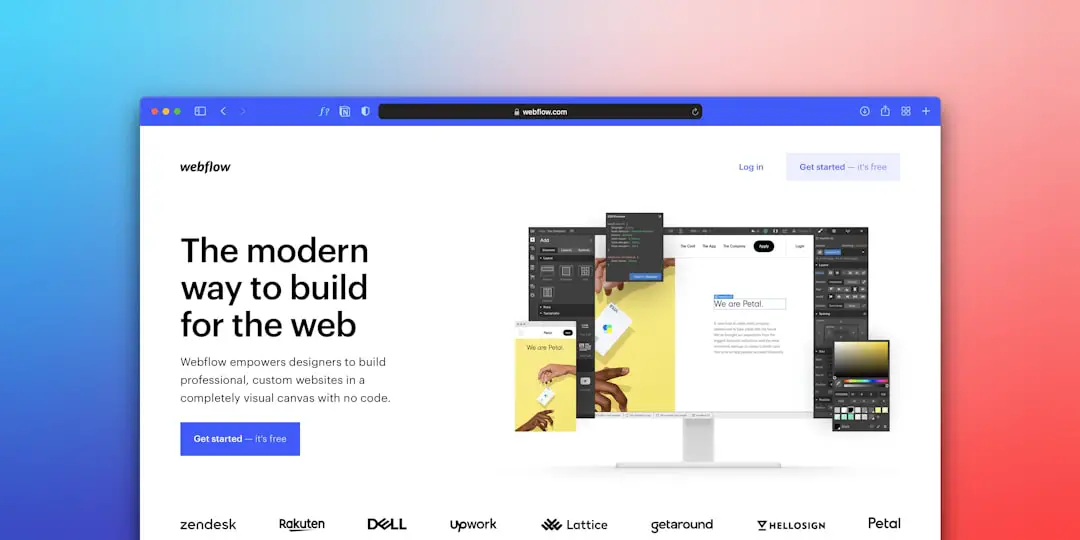
Key questions to ask:
- Is the primary CTA clearly visible above the fold?
- Do headings communicate value clearly?
- Is there excessive visual clutter?
- Are color contrasts accessible and consistent?
Poor hierarchy often leads to confusion, which directly reduces conversions.
3. Evaluate Navigation and Information Architecture
Navigation should feel intuitive. If users struggle to find information, they often abandon the website altogether.
The UX audit should examine:
- Main navigation clarity
- Logical categorization of content
- Internal linking structure
- Search functionality effectiveness
- Breadcrumb usage
A clear information architecture reduces cognitive load and keeps users moving toward conversion points.
4. Review Conversion Paths and CTAs
Every high-performing website has clearly defined conversion paths. The audit should map each step users must take to complete a desired action.
- Are CTAs consistent across pages?
- Does the language focus on benefits rather than features?
- Are there too many competing actions?
- Are CTAs placed strategically throughout long pages?
Clear, compelling calls-to-action should feel like a natural next step rather than a disruptive demand.
5. Assess Mobile Responsiveness
Mobile traffic often exceeds desktop traffic. A UX audit must thoroughly evaluate mobile usability.

Areas to assess:
- Text readability without zooming
- Button size and tap targets
- Menu accessibility on small screens
- Loading speed on mobile networks
- Form usability on touch devices
Mobile friction is one of the biggest silent killers of conversions.
6. Optimize Forms and Checkout Experience
Forms are often where conversions are won or lost. Whether it is a sign-up, contact, or checkout form, simplicity is crucial.
The UX checklist should include:
- Minimizing required fields
- Providing inline validation and helpful error messages
- Using clear labels instead of placeholder-only text
- Offering guest checkout options (for ecommerce)
- Displaying progress indicators in multi-step forms
Reducing friction in forms can significantly increase completion rates.
7. Review Content Clarity and Messaging
Content must be concise, persuasive, and aligned with the target audience’s needs. The audit should evaluate:
- Clarity of headlines
- Scannability of text
- Use of bullet points and subheadings
- Tone consistency
- Avoidance of jargon
Users do not read word-by-word; they scan. Therefore, structure and formatting directly impact comprehension and conversion.
8. Examine Trust and Credibility Signals
Trust is foundational to conversions. Without credibility, users hesitate.

The UX audit should ensure the presence of:
- Customer testimonials
- Case studies
- Security badges (for transactions)
- Clear privacy policies
- Contact information visibility
Strategic placement of trust signals near CTAs can significantly boost conversion rates.
9. Check Page Speed and Technical Performance
Performance is a core UX factor. Slow-loading websites increase bounce rates dramatically.
The audit should analyze:
- Page load times
- Image optimization
- Script performance
- Core Web Vitals
- Broken links or errors
Even a delay of one second can reduce conversions by a noticeable margin.
10. Use UX Audit Tools for Data-Driven Insights
While manual review is important, data-driven tools provide essential evidence. Below is a comparison of commonly used UX audit tools:
| Tool | Primary Function | Best For | Strength |
|---|---|---|---|
| Google Analytics | User behavior tracking | Conversion funnel analysis | Deep traffic insights |
| Hotjar | Heatmaps and session recordings | Visualizing user behavior | Identifying friction points |
| Lighthouse | Performance auditing | Technical optimization | Core Web Vitals scoring |
| Crazy Egg | Click tracking and scroll maps | Engagement analysis | Visual data reports |
Using both qualitative feedback and quantitative data ensures decisions are backed by measurable evidence.
11. Conduct User Testing
No UX audit is complete without real user feedback. Observing how real users interact with a website often reveals blind spots that analytics alone cannot uncover.
- Usability testing sessions
- A/B testing different layouts
- Surveys and feedback forms
- Customer interviews
Even testing with a small group of users can surface major usability issues.
Final Thoughts
A UX audit is not a one-time project but an ongoing process. User expectations evolve, competitive landscapes shift, and technology advances. Regular audits ensure a website remains optimized for performance, usability, and conversions.
By systematically reviewing goals, navigation, content, mobile responsiveness, forms, trust elements, and performance metrics, businesses can create seamless experiences that naturally drive conversions. The most successful digital products are not built by chance; they are refined continuously through thoughtful UX evaluation.
Frequently Asked Questions (FAQ)
1. How often should a UX audit be conducted?
Most businesses benefit from conducting a UX audit at least once a year or after major website updates. High-traffic or ecommerce sites may require quarterly reviews.
2. What is the difference between a UX audit and a UI audit?
A UX audit focuses on overall user experience, including usability and user flow, while a UI audit primarily examines visual design elements such as colors, typography, and layout consistency.
3. How long does a UX audit take?
The timeline depends on the size of the website. Small sites may require a few days, while complex platforms can take several weeks.
4. Can small businesses benefit from a UX audit?
Yes. Even minor usability improvements can significantly increase conversions, making a UX audit valuable for businesses of all sizes.
5. Is a UX audit expensive?
Costs vary depending on scope and expertise. However, the return on investment often outweighs the initial cost due to improved conversion rates and user satisfaction.
6. What metrics indicate UX problems?
High bounce rates, low time on page, cart abandonment, low conversion rates, and negative user feedback are all indicators of potential UX issues.