
In a digital environment where websites, platforms, and online services increasingly rely on location, device identity, and traffic patterns to decide what users can access, proxy services have become a common tool for businesses, researchers, and privacy-conscious individuals. 9Proxy is one such service, typically discussed in the context of residential proxy access, IP rotation, web testing, market research, and data collection workflows. Understanding what it does, how it works, and where its risks and responsibilities lie is essential before using it in any professional setting.
TLDR: 9Proxy is a proxy service that allows users to route internet traffic through alternative IP addresses, often from residential networks, to appear as if they are browsing from different locations or devices. It can be used for legitimate tasks such as ad verification, SEO monitoring, localized testing, and market research. However, it should be used carefully, ethically, and in compliance with laws, platform terms, and data privacy rules. The key value of 9Proxy is controlled IP routing, but the key responsibility is using that capability transparently and lawfully.
What Is 9Proxy?
9Proxy is generally understood as a proxy access platform that provides users with a pool of IP addresses through which they can route their web traffic. Instead of connecting directly to a website from your own internet connection, your request passes through a proxy server or proxy endpoint first. The target website then sees the proxy IP address rather than your original IP address.
This type of service is useful because many online systems treat IP address information as a signal. An IP address can indicate geographic location, internet service provider, device type, and reputation history. By routing traffic through different IPs, users can test how websites behave in different regions, avoid unnecessary blocks during large-scale research, or verify whether advertisements and search results appear correctly in specific markets.
In practical terms, 9Proxy is not simply about “hiding” an IP address. A serious proxy service is more accurately described as an infrastructure layer that helps manage traffic identity, geographic routing, session control, and access reliability.

How Does 9Proxy Work?
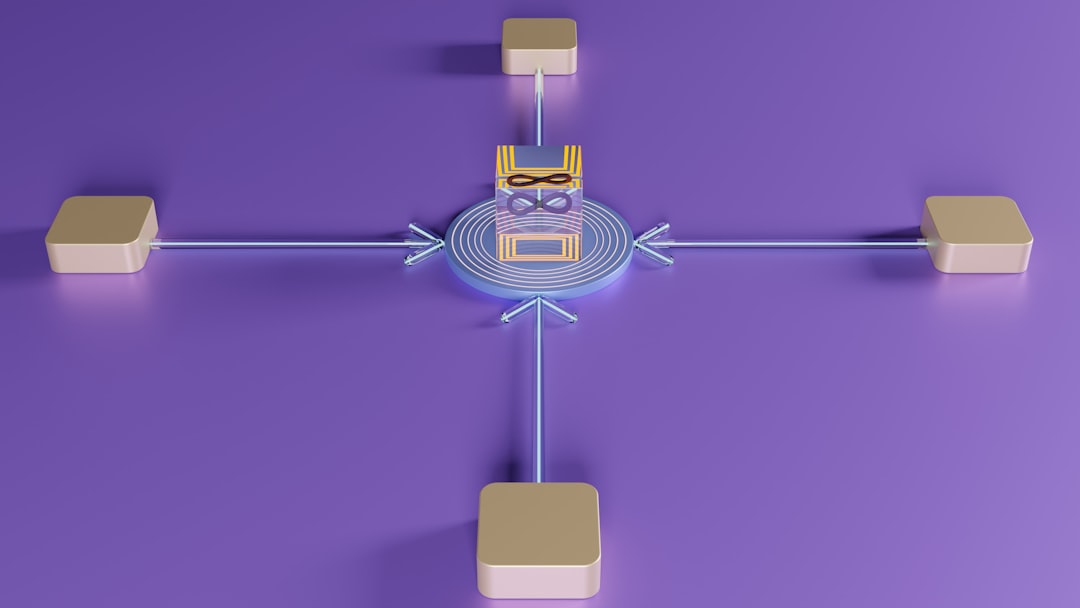
At the technical level, 9Proxy works by acting as an intermediary between your device, software, or automation tool and the destination website. When a request is made, it is sent through the proxy network. The proxy forwards the request to the target site, receives the response, and sends the response back to you.
The simplified process looks like this:
- Your application sends a request to access a website, platform, or online service.
- The request is routed through 9Proxy instead of going directly from your local IP address.
- The destination website sees the proxy IP as the source of the request.
- The website sends data back to the proxy endpoint.
- 9Proxy forwards the response back to your browser, script, or software tool.
This process may happen in fractions of a second, but it changes the network identity presented to the destination server. Depending on the configuration, users may be able to choose proxy locations, rotate IP addresses, maintain sticky sessions, or integrate proxies into browsers and automation platforms.
Residential Proxies vs. Datacenter Proxies
To understand 9Proxy properly, it is important to understand the difference between common proxy types. Many proxy providers offer either datacenter proxies, residential proxies, or both.
- Datacenter proxies come from cloud servers or hosting providers. They are usually fast and affordable, but they can be easier for websites to detect because many IPs originate from known server networks.
- Residential proxies use IP addresses associated with real household internet connections. These tend to look more like ordinary user traffic and may be better suited for location-based testing, market research, and platforms that apply strict IP reputation checks.
- Mobile proxies route traffic through mobile carrier networks. They can be useful for testing mobile experiences, app behavior, or carrier-specific content, but they are usually more expensive.
If 9Proxy provides residential proxy access, its main advantage is that the traffic may appear to originate from regular consumer internet connections rather than obvious data centers. This can improve access reliability for legitimate use cases, but it also increases the importance of consent, compliance, and responsible use.
Key Features Commonly Associated With 9Proxy
While exact features may vary depending on the service plan or product version, proxy platforms like 9Proxy commonly include several capabilities that matter to business and technical users.
1. IP Rotation
IP rotation means changing the proxy IP address at set intervals or after each request. This is often used to reduce the chance of repeated requests from a single IP being flagged as suspicious. For example, a company collecting public pricing information across multiple regions may use rotating proxies to avoid overloading one connection or triggering basic rate limits.
2. Sticky Sessions
A sticky session keeps the same proxy IP for a specific period. This is useful when a website expects continuity, such as maintaining a shopping cart, viewing localized pages consistently, or testing the same user journey from one location.
3. Geographic Targeting
Many proxy platforms allow users to choose IPs by country, region, or city. Geographic targeting is valuable for localization testing, ad verification, travel fare research, international SEO checks, and content availability monitoring.
4. Authentication and Access Control
Proxy services usually support username and password authentication, IP whitelisting, or token-based access. These controls help prevent unauthorized use of proxy resources and make it easier for teams to manage secure integrations.
5. API or Software Integration
Professional users often need to connect proxies to browsers, scraping tools, testing environments, or custom applications. A service like 9Proxy may support standard proxy protocols such as HTTP, HTTPS, and possibly SOCKS5, depending on the offering.


Common Use Cases for 9Proxy
Proxy technology has a wide range of legitimate uses. The most important point is that the activity should be lawful, transparent when required, and respectful of website rules and user privacy.
Market Research
Businesses may use 9Proxy to view public web content from different regions. This can help them compare pricing, product availability, promotional campaigns, and competitor positioning. For companies operating internationally, location-specific market visibility can be essential.
SEO Monitoring
Search results often differ by country, city, language, and user context. SEO teams may use proxies to check how rankings appear in specific locations. This can help brands measure local visibility and identify regional search performance issues.
Ad Verification
Advertising teams use proxies to confirm whether ads are being displayed correctly, whether they appear in the intended country, and whether fraudulent or unauthorized placements are occurring. This is especially relevant for agencies managing campaigns across multiple markets.
Website and Application Testing
Developers and QA teams can use proxies to test how websites behave for users in different locations. This includes language settings, currency display, tax calculations, shipping availability, compliance banners, and content restrictions.
Brand Protection
Companies may monitor public websites, marketplaces, and social platforms for counterfeit products, unauthorized sellers, phishing pages, or misuse of brand assets. Proxies can support this work by enabling broader visibility across regions.
Benefits of Using 9Proxy
When used responsibly, 9Proxy can provide several practical advantages for individuals and organizations.
- Improved access to localized information: Users can see how websites appear from different regions.
- Better reliability for research workflows: Rotating IPs can reduce accidental blocks caused by repeated requests from one address.
- More accurate testing: Teams can verify real-world behavior across markets rather than relying on assumptions.
- Operational flexibility: Proxies can be integrated into browsers, scripts, testing tools, and data pipelines.
- Privacy separation: A proxy can prevent a destination site from seeing the user’s original IP address directly.
However, these benefits should not be confused with guaranteed anonymity. A proxy changes the visible IP address, but websites may still use cookies, browser fingerprints, login history, device signals, and behavioral analytics to identify users or sessions.
Risks and Limitations
No proxy service should be treated as a magic solution. 9Proxy, like any proxy platform, has technical, legal, and operational limitations.
First, proxies can fail or slow down. Because traffic is routed through an additional network layer, latency may increase. Some IPs may be blocked, unavailable, or less reliable than others.
Second, websites may still detect proxy usage. Advanced platforms analyze IP reputation, request patterns, browser fingerprints, headers, cookies, and timing behavior. If traffic looks automated or abusive, it may still be challenged or blocked.
Third, compliance matters. Accessing public information may be permitted in some contexts, but violating terms of service, bypassing security controls, collecting personal data unlawfully, or overloading a website can create serious legal and reputational risks.
Fourth, provider transparency is important. For residential proxy services, users should understand how IPs are sourced. Ethical residential proxy networks should rely on informed consent, clear participation terms, and responsible network management.
How to Use 9Proxy Responsibly
Responsible use is not optional. It is the foundation of professional proxy operations. Before using 9Proxy, organizations should define a clear acceptable-use policy and ensure that their activities align with applicable laws and contractual obligations.
- Respect robots.txt and site rules where applicable, especially for automated data collection.
- Avoid collecting sensitive personal data unless there is a lawful basis and proper privacy controls.
- Use reasonable request rates to avoid harming website performance.
- Do not use proxies for fraud, spam, account abuse, credential attacks, or evasion of security systems.
- Document your purpose so teams understand why proxies are being used and what boundaries apply.
- Monitor logs and usage to detect misconfiguration, excessive requests, or unauthorized activity.


9Proxy Setup: What the Workflow Usually Looks Like
Although setup details depend on the platform interface, using a proxy service usually follows a standard workflow. A user creates an account, selects a plan or proxy package, chooses location and rotation settings, and then copies proxy credentials into the relevant tool.
For browser use, this may involve entering the proxy host, port, username, and password into browser proxy settings or a proxy extension. For software use, the same details are typically added to an application configuration file or API client. For automation, developers may configure the proxy inside tools such as browser automation frameworks, HTTP clients, or testing scripts.
A careful setup should include testing the IP location, verifying authentication, checking speed, and confirming that the target workflow behaves as expected. Teams should also monitor error rates, blocks, and response times to decide whether rotation settings or request patterns need adjustment.
Who Should Consider 9Proxy?
9Proxy may be relevant for professionals who need controlled access to location-specific or IP-sensitive online content. This includes SEO specialists, data analysts, QA engineers, cybersecurity researchers, ad verification teams, ecommerce intelligence teams, and brand protection departments.
It may be less suitable for casual users who simply want private browsing. In that case, a reputable VPN or privacy-focused browser setup may be easier to manage. Proxies are powerful, but they are also more technical and require more careful configuration.
Final Thoughts
9Proxy is best understood as a traffic routing and IP management tool. It helps users send web requests through alternative IP addresses, often with options for rotation, location targeting, and session control. This can make it valuable for legitimate business functions such as market research, SEO monitoring, ad verification, testing, and brand protection.
At the same time, the power of a proxy service comes with responsibility. Users should evaluate how the proxy network sources its IPs, what security controls are available, and whether their intended use complies with laws and platform policies. When implemented thoughtfully, 9Proxy can be a practical part of a professional internet research or testing stack. When used carelessly, it can create technical, legal, and reputational problems. The safest approach is to treat proxies not as a shortcut, but as infrastructure that must be governed with the same seriousness as any other business technology.